Loop structures allow repeating one or more lines of code, mainly including for loops and while loops. The number of iterations in a for loop is fixed; in a while loop, it is uncertain (loops until a condition is met). This section introduces the for loop.
for Loop
[Excel VBA] The For loop repeats operations a specified number of times. Syntax:
For Num = First To Last [Step Inc]
    statements
Next [Num]
Runs statements when Num is between First and Last. Num is the iteration variable, First is the initial value, Last is the final value, and Step is the interval between iterations.
[Python] The for loop repeats operations a specified number of times. Syntax:
for iteration_variable in iterable_object:
    statements
Iterates over the iterable_object (e.g., strings, lists, tuples, dictionaries) and performs the same operation on each element.
The following example outputs values from 1 to 500 in steps of 100 in the Immediate Window.
[Excel VBA] Sample file path: Samples\ch05\Excel VBA\ForLoop.xlsm
Sub Test1()
    Dim intA As Integer
    For intA = 1 To 500 Step 100
        Debug.Print intA
    Next
End Sub
Output in the Immediate Window:
1
101
201
301
401
[Python] Sample .py file path: Samples\ch05\Python\sam05-007.py
for num in range(1, 500, 100):
    print(num)
Output in the IDLE command-line window:
>>> = RESTART: ...\Samples\ch05\Python\sam05-007.py
1
101
201
301
401
The following example accumulates integers from 1 to 10.
[Excel VBA] Sample file path: Samples\ch05\Excel VBA\ForLoop.xlsm
Sub Test2()
    Dim intI As Integer, intSum As Integer  ' Store the sum
    intSum = 0
    For intI = 1 To 10
        intSum = intSum + intI  ' Accumulate
    Next
    Debug.Print intSum
End Sub
Output in the Immediate Window: 55 (sum of 1–10).
[Python] Sample .py file path: Samples\ch05\Python\sam05-008.py
sum = 0
num = 0
for num in range(11):  # num takes values class="text-secondary">from 0 to 10
    sum += num
print(sum)
Output in the IDLE command-line window:
>>> = RESTART: ...\Samples\ch05\Python\sam05-008.py
55
Nested for Loops
Nested loops contain a new loop structure inside the outer loop (two or more layers). The following example uses nested for loops to generate the multiplication table.
[Excel VBA] Sample file path: Samples\ch05\Excel VBA\ForLoop.xlsm
Sub Test3()
    Dim intI As Integer, intJ As Integer
    For intI = 1 To 9
        For intJ = 1 To intI
            ' Use Trim to remove leading/trailing spaces
            Debug.Print CStr(intJ) & "*" & CStr(intI) & "=" & Trim(CStr(intJ * intI)) & " ";
        Next intJ
        Debug.Print  ' New line
    Next intI
End Sub
Output in the Immediate Window (multiplication table):
1*1=1
1*2=2 2*2=4
1*3=3 2*3=6 3*3=9
...
1*9=9 2*9=18 ... 9*9=81
[Python] Sample .py file path: Samples\ch05\Python\sam05-009.py
for i in range(1, 10):
    s = ''
    for j in range(1, i + 1):
        s += str.format('{1}*{0}={2} ', i, j, i * j)
    print(s)
Lines 1–5 generate the multiplication table (lower triangular shape). The output matches the Excel VBA result.
for...else in Python
Python’s for loop supports a for...else structure, where the else block executes after the loop completes normally (without break). The following example checks if an integer is prime.
Sample .py file path: Samples\ch05\Python\sam05-010.py
n = int(input('Please enter a number:'))
for i in range(2, n):
    if n % i == 0:
        print(str(n) + ' is not a prime number')
        break
else:
    print(str(n) + ' is a prime number')
Lines 2–7 use for...else to check primality: if n is divisible by any number in 2–n-1, it is not prime; otherwise, it is prime.
In the IDLE command-line window:
>>> = RESTART: ...\Samples\ch05\Python\sam05-010.py
Please enter a number: 5
5 is a prime number
>>> = RESTART: ...\Samples\ch05\Python\sam05-010.py
Please enter a number: 9
9 is not a prime number
Example: Find Maximum and Minimum Values of Given Data
Given data in Column A of a worksheet (Figure 5-2), find the maximum and minimum values.
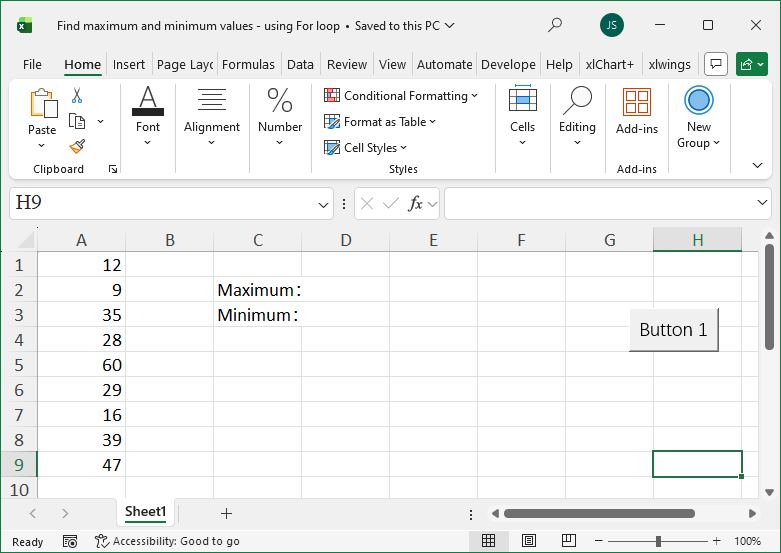
Figure 5-2
[Excel VBA] Sample file path: Samples\ch05\Excel VBA\FindMaxMin_ForLoop.xlsm
Sub MaxMin()
    Dim intI As Integer
    Dim sngMax As Single, sngMin As Single  ' Store max/min
    Dim sngT As Single
    Dim intRows As Integer
    ' Initialize max/min with the first value
    sngMax = ActiveSheet.Cells(1, 1).Value
    sngMin = ActiveSheet.Cells(1, 1).Value
    ' Get the last row of data in Column A
    intRows = ActiveSheet.Range("A1").End(xlDown).Row
    ' Iterate from the second value to the last
    For intI = 2 To intRows
        sngT = ActiveSheet.Cells(intI, 1).Value
        If sngT > sngMax Then sngMax = sngT  ' Update max
        If sngT < sngMin Then sngMin = sngT  ' Update min
    Next
    ' Output results
    ActiveSheet.Cells(2, 4).Value = sngMax
    ActiveSheet.Cells(3, 4).Value = sngMin
End Sub
Running the program outputs the max/min in the worksheet (Figure 5-2).
[Python] Sample data file: Samples\ch05\Python\FindMaxMin_ForLoop.xlsx Sample .py file: sam05-02.py
class="text-secondary">import xlwings class="text-secondary">as xw
class="text-secondary">from xlwings.constants class="text-secondary">import Direction
class="text-secondary">import os
root = os.getcwd()
app = xw.App(visible=True, add_book=False)
bk = app.books.open(fullname=root + r'\FindMaxMin_ForLoop.xlsx', read_only=False)
sht = bk.sheets(1)  # Get the first worksheet
# Get the last row of data in Column A
rows = sht.api.Range('A1').End(Direction.xlDown).Row
max_v = sht.range('A1').value
min_v = sht.range('A1').value
# Iterate through data cells
for rng in sht.range('A1:A' + str(rows)):
    tp = rng.value  # Get the value
    if tp > max_v: max_v = tp  # Update max
    if tp < min_v: min_v = tp  # Update min
# Output results
sht.cells(2, 4).value = max_v
sht.cells(3, 4).value = min_v
Running the script outputs the max/min in the worksheet (Figure 5-2).