Both Excel VBA and Python provide functions to convert string case (all uppercase, lowercase, or title case).
Setting String Case
[Excel VBA] Use LCase (lowercase), UCase (uppercase), or StrConv (convert case). Sample file: Samples\ch06\Excel VBA\CaseConversion.xlsm.
code.vba
Sub Test()
    Dim strL As String
    strL = "Hello Python & VBA!"
    Debug.Print LCase(strL)   ' hello python & vba!
    Debug.Print UCase(strL)   ' HELLO PYTHON & VBA!
End Sub
Sub Test2()
    strL = "Hello Python & VBA!"
    Debug.Print StrConv(strL, vbUpperCase)   ' HELLO PYTHON & VBA!
    Debug.Print StrConv(strL, vbLowerCase)   ' hello python & vba!
    Debug.Print StrConv(strL, vbProperCase)  ' Hello Python & Vba! (title case)
End Sub
[Python] Methods: upper(), lower(), capitalize(), swapcase(). Also, string.capwords() for title case per word.
code.python
>>> a = 'Hello Python & VBA!'
>>> a.upper()          # HELLO PYTHON & VBA!
>>> a.lower()          # hello python & vba!
>>> a.capitalize()     # Hello python & vba! (only first letter uppercase)
>>> a.swapcase()       # hELLO pYTHON & vba! (swap case)
>>> class="text-secondary">import string
>>> string.capwords(a, ' ')  # Hello Python & Vba! (title case per word)
Example: Uniform Case for Column Data
Convert names in column B (all uppercase) to title case (first letter uppercase, rest lowercase; Figure 6-3).
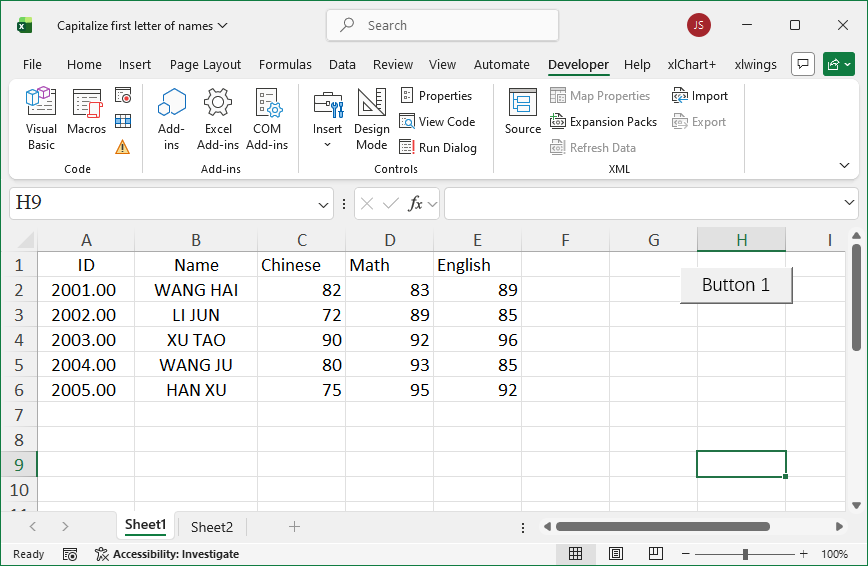
Figure 6-3
[Excel VBA] Use StrConv with vbProperCase. Sample file: Samples\ch06\Excel VBA\TitleCaseNames.xlsm.
code.vba
Sub Test()
    Dim intI As Integer, intRows As Integer
    Dim strName As String
    intRows = ActiveSheet.Range("B1").End(xlDown).Row
    For intI = 2 To intRows
        strName = ActiveSheet.Cells(intI, 2).Value
        ActiveSheet.Cells(intI, 2).Value = StrConv(strName, vbProperCase)
    Next
End Sub
[Python] Use string.capwords(). Sample file: Samples\ch06\Python\TitleCaseNames.xlsx, script sam06-03.py.
code.python
class="text-secondary">import xlwings class="text-secondary">as xw
class="text-secondary">import string
class="text-secondary">from xlwings.constants class="text-secondary">import Direction
class="text-secondary">import os
root = os.getcwd()
app = xw.App(visible=True, add_book=False)
bk = app.books.open(root + r'\TitleCaseNames.xlsx', read_only=False)
sht = bk.sheets(1)
rows = sht.api.Range('B1').End(Direction.xlDown).Row
n = 1
for rng in sht.range('B2:B' + str(rows)):
    n += 1
    sht.cells(n, 2).value = string.capwords(rng.value)