Indexing and slicing refer to locating and extracting one or more individual characters, or contiguous substrings, from a given string.
String Indexing
Indexing finds a specified character in the string.
[Excel VBA] Use Left, Right, and Mid functions. Left extracts from the leftmost position, Right from the rightmost, Mid from a specified position. If the count is 1, it indexes a single character.
Sample file path: Samples\ch06\Excel VBA\IndexAndSlice.xlsm.
Sub Test()
    Dim strA As String, strB As String, strC As String, strD As String, strE As String
    strA = "abcdefg"
    strB = Left(strA, 1)          ' leftmost char
    strC = Right(strA, 1)         ' rightmost char
    strD = Mid(strA, 2, 1)         ' 2nd char
    strE = Mid(strA, Len(strA)-1, 1) ' 2nd from right
    Debug.Print strB, strC, strD, strE
End Sub
Output:
a g b f[Python] Use [] for indexing:
>>> a = 'abcdefg'
>>> a[0]   # leftmost
'a'
>>> a[-1]  # rightmost
'g'
>>> a[1]   # 2nd char
'b'
>>> a[-2]  # 2nd class="text-secondary">from right
'f'
Indexing from left starts at 0; from right starts at -1.
Traversing a String
Traversing means accessing each character from left to right.
[Excel VBA] Use a For loop with Mid. Sample file path: Samples\ch06\Excel VBA\IndexAndSlice.xlsm.
Sub Test2()
    Dim strA As String, intI As Integer
    strA = "VBA"
    For intI = 1 To Len(strA)
        Debug.Print Mid(strA, intI, 1)
    Next
End Sub
Output:
V
B
A
[Python]
>>> for c in 'Python':
    print(c)
Output:
P
y
t
h
o
n
String Slicing
Slicing extracts multiple contiguous characters.
[Excel VBA] Use Left, Right, Mid. Sample file path: Samples\ch06\Excel VBA\IndexAndSlice.xlsm.
Sub Test3()
    Dim strA As String, strB As String, strC As String, strD As String
    strA = "abcdefg"
    strB = Left(strA, 3)   ' first 3 chars
    strC = Right(strA, 3)  ' last 3 chars
    strD = Mid(strA, 2, 5)  ' from 2nd char, length 5
    Debug.Print strB, strC, strD
End Sub
Output:
abc efg bcdef[Python] Use []. Slice operations are shown in Table 6-3.
Table 6-3 String Slicing in Python
Examples:
>>> a = 'abcdefg'
>>> a[:3]    # first 3 chars
'abc'
>>> a[-3:]   # last 3 chars
'efg'
>>> a[1:6]   # class="text-secondary">from 2nd char(index 1) up to but not including index 6
'bcdef'
This follows the “include start, exclude end” rule.
Example: Calculate Age from ID Card Number
Digits 7–10 of an ID card represent the birth year. Given a table of ID numbers (Figure 6-1), calculate ages.
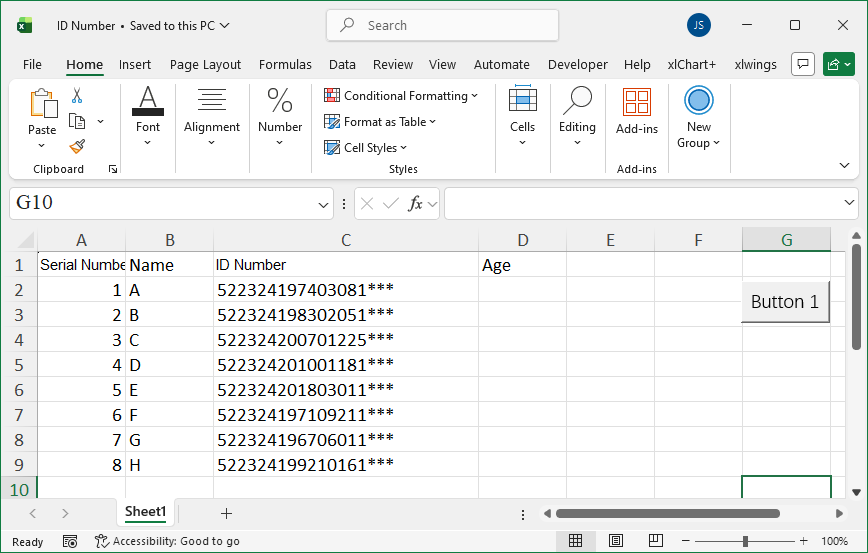
Figure 6-1
[Excel VBA] Use a For loop to traverse each ID, Mid to get birth year, Year(Now) for current year, subtract to get age. Sample file path: Samples\ch06\Excel VBA\AgeFromID.xlsm.
Sub Test()
    Dim intI As Integer, intR As Integer
    intR = ActiveSheet.Range("C1").End(xlDown).Row
    For intI = 2 To intR
        ActiveSheet.Cells(intI, 4).Value = _
        Year(Now) - Mid(ActiveSheet.Cells(intI, 3).Value, 7, 4)
    Next
End Sub
Output appears in column D.
[Python] Use datetime.now().year and slicing. Sample file: Samples\ch06\Python\AgeFromID.xlsx, script sam06-01.py.
class="text-secondary">import xlwings class="text-secondary">as xw
class="text-secondary">from xlwings.constants class="text-secondary">import Direction
class="text-secondary">import os
class="text-secondary">from datetime class="text-secondary">import datetime
root = os.getcwd()
app = xw.App(visible=True, add_book=False)
bk = app.books.open(root + r'\AgeFromID.xlsx', read_only=False)
sht = bk.sheets(1)
rows = sht.api.Range('C1').End(Direction.xlDown).Row
n = 1
for rng in sht.range('C2:C' + str(rows)):
    n += 1
    sht.cells(n, 4).value = datetime.now().year - int(str(rng.value)[6:10])
Output appears in column D.