Symbolic operations (including calculus) can be implemented using Python’s Sympy package. Excel’s built-in Python supports Sympy. Before using Sympy, it must be imported first.
Functions and Limits
In Sympy, the subs function can be used to compose functions. Below, we compose
and
into a single function, specifying
as the independent variable.
As shown in Figure 8-1, open Excel 365, click cell B4, and enter =PY( in the formula bar to enter Python mode.
Enter the following code in the formula bar:
import sympy as sp
x, y = sp.symbols('x, y')  # Create symbolic variables x and y
f = 1 / sp.sin(x)          # Define function f
g = sp.tan(y)              # Define function g
# Compose functions and specify x as the independent variable; output as a string
str(f.subs(x, g).subs(y, x))
Press Ctrl+Enter. Cell B4 outputs the composed function (Figure 8-1).
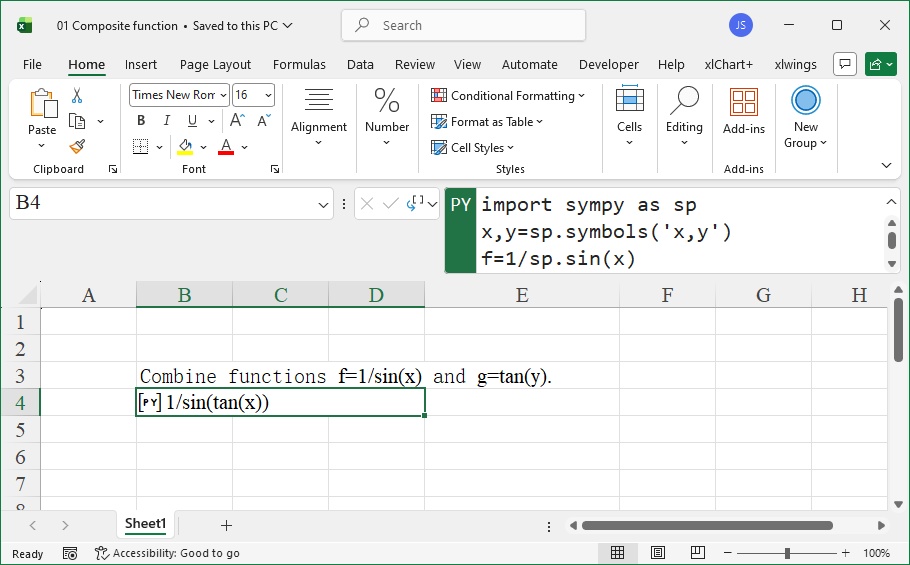
Figure 8-1 Composing Functions
Next, we calculate the limit
.
As shown in Figure 8-2, click cell B4, enter =PY( to enter Python mode, and input:
import sympy as sp
x = sp.Symbol('x')
f = (x - 2) / (x**2 - 4)
str(sp.limit(f, x, 2))
Press Ctrl+Enter. Cell B4 outputs the limit result
(Figure 8-2).
For the limit
, click cell E4, enter =PY(, and input:
import sympy as sp
x = sp.Symbol('x')
f = (3*x - 8) / (7*x + 1)
str(sp.limit(f, x, sp.oo))
Press Ctrl+Enter. Cell E4 outputs the result
(Figure 8-2).
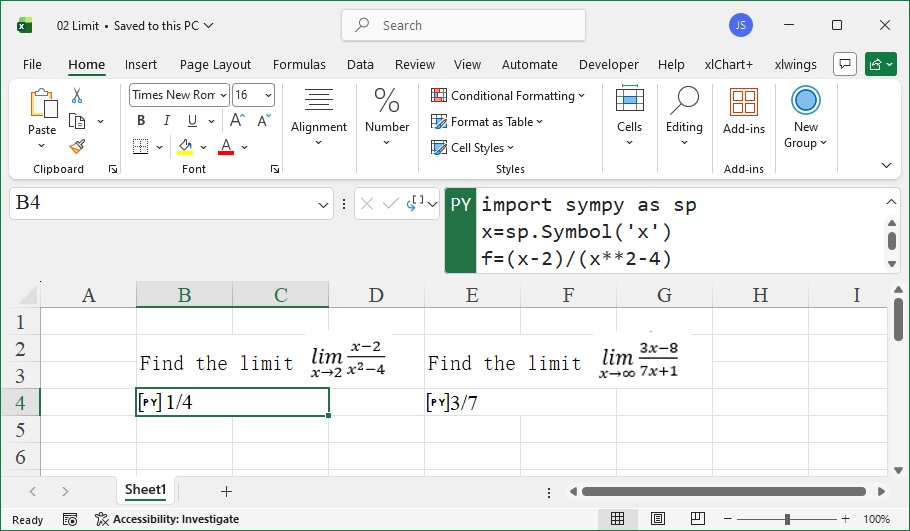
Figure 8-2 Calculating Limits of Functions
Derivatives
In Sympy, the diff function computes derivatives. The diff function allows specifying the order of differentiation and the symbol variable to differentiate with respect to.
We calculate the derivative of
.
As shown in Figure 8-3, click cell B4, enter =PY(, and input:
import sympy as sp
x = sp.Symbol('x')
f = (x - 1)**3 / (x + 1)
b = sp.diff(f, x)          # First derivative
str(sp.simplify(b))        # Simplify the result
Press Ctrl+Enter. Cell B4 outputs the first derivative (Figure 8-3).
For the second derivative of
, click cell B8, enter =PY(, and input:
import sympy as sp
x = sp.Symbol('x')
f = (x - 1)**3 / (x + 1)
b = sp.diff(f, x, 2)       # Second derivative
str(sp.simplify(b))
Press Ctrl+Enter. Cell B8 outputs the second derivative (Figure 8-3).
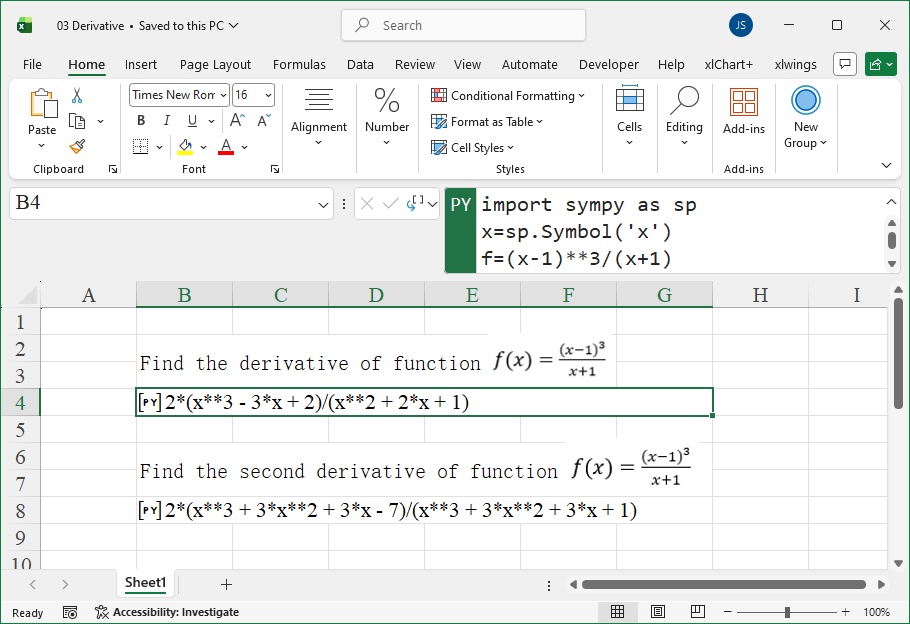
Figure 8-3 Calculating Derivatives of Functions
Indefinite Integrals
In Sympy, the integrate function computes indefinite integrals.
We calculate the indefinite integral
.
As shown in Figure 8-4, click cell B5, enter =PY(, and input:
import sympy as sp
x = sp.Symbol('x')
f = 1 / (1 + x**2)
str(sp.integrate(f))
Press Ctrl+Enter. Cell B5 outputs the result
(Figure 8-4).
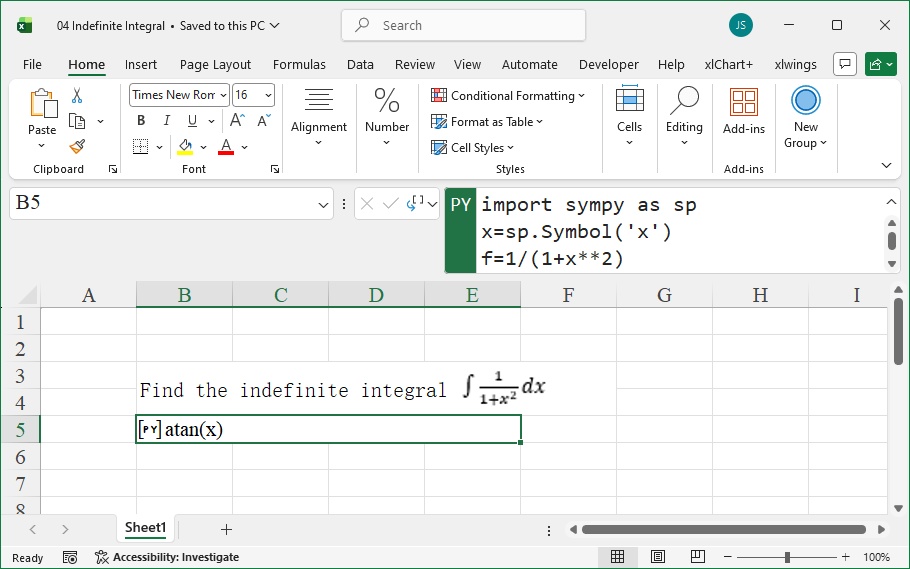
Figure 8-4 Calculating Indefinite Integrals
Definite Integrals
In Sympy, the integrate function computes definite integrals. When using this function, specify the integration variable, lower bound, and upper bound (enclosed in parentheses).
We calculate the definite integral
.
As shown in Figure 8-5, click cell B4, enter =PY(, and input:
import sympy as sp
x = sp.Symbol('x')
f = x**7
str(sp.integrate(f, (x, 0, 1)))  # Integrate f with respect to x from 0 to 1
Press Ctrl+Enter. Cell B4 outputs the result
(Figure 8-5).
For the definite integral
, click cell B8, enter =PY(, and input:
import sympy as sp
x = sp.Symbol('x')
f = 1 / x
str(sp.integrate(f, (x, 1, 2)))
Press Ctrl+Enter. Cell B8 outputs the result
(Figure 8-5).
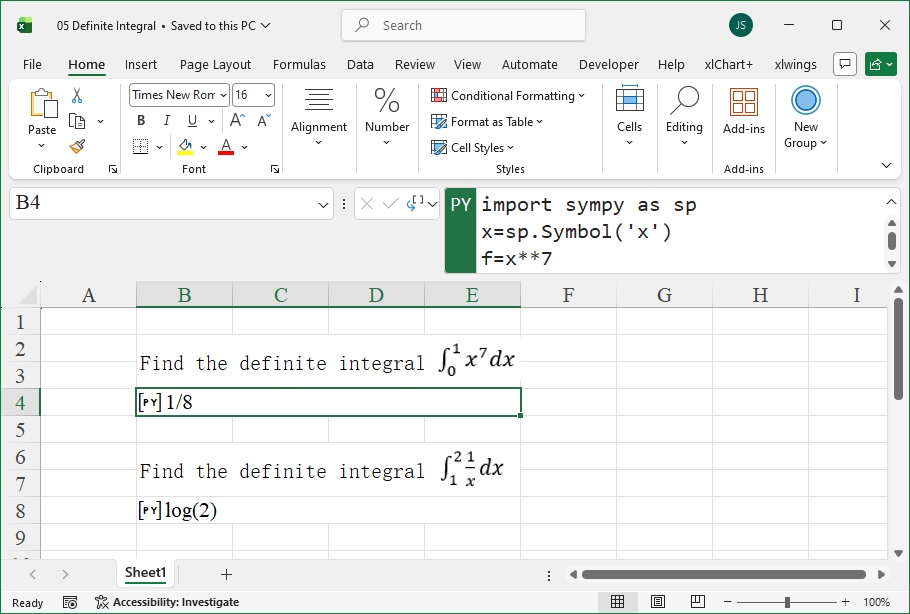
Figure 8-5 Calculating Definite Integrals
Series
In Sympy, the series function computes Taylor series expansions of functions.
We calculate the Taylor series expansion of
.
As shown in Figure 8-6, click cell B4, enter =PY(, and input:
import sympy as sp
x = sp.Symbol('x')
f = 1 / (5 + 4 * sp.cos(x))
str(sp.series(f, x))  # Taylor series expansion around x=0
Press Ctrl+Enter. Cell B4 outputs the series result (Figure 8-6).
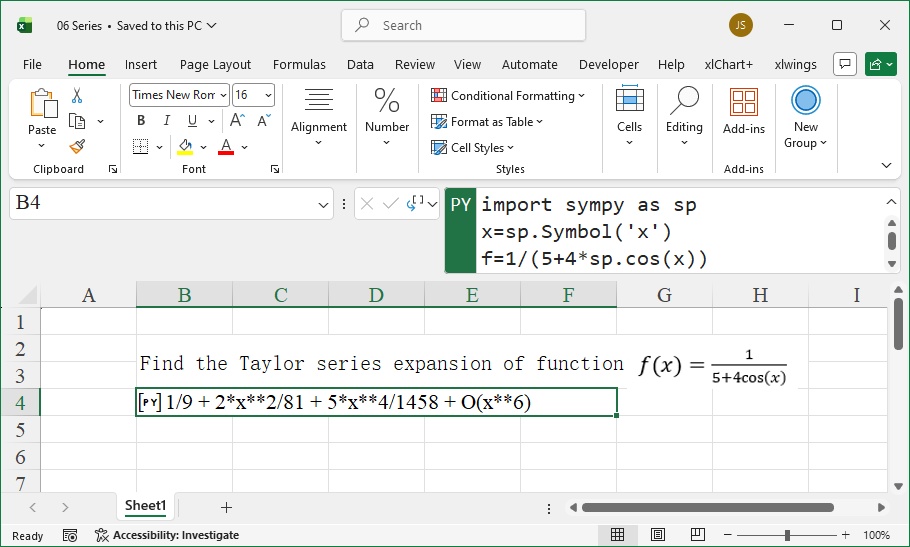
Figure 8-6 Calculating Taylor Series Expansions